> ## Documentation Index
> Fetch the complete documentation index at: https://docs.zenable.io/llms.txt
> Use this file to discover all available pages before exploring further.
# Requirements & Guardrails
> Define requirements, review auto-generated enforcement code, and visualize governance dependencies in the web console
## Overview
The Zenable management interface defines quality, functional, and security requirements, allows you to review and refine generated guardrail code, and
analyze relationships between requirements and enforcement points. Get started at [zenable.app](https://www.zenable.app?utm_source=docs\&utm_medium=requirements-guardrails\&utm_content=get-started).
**What you can do:**
* Upload policy documents or define requirements directly
* Review auto-generated guardrail code (Terraform, K8s, Semgrep, etc.)
* Visualize governance graph to understand requirement dependencies
* Enable/disable specific guardrails for your environment
## Requirements
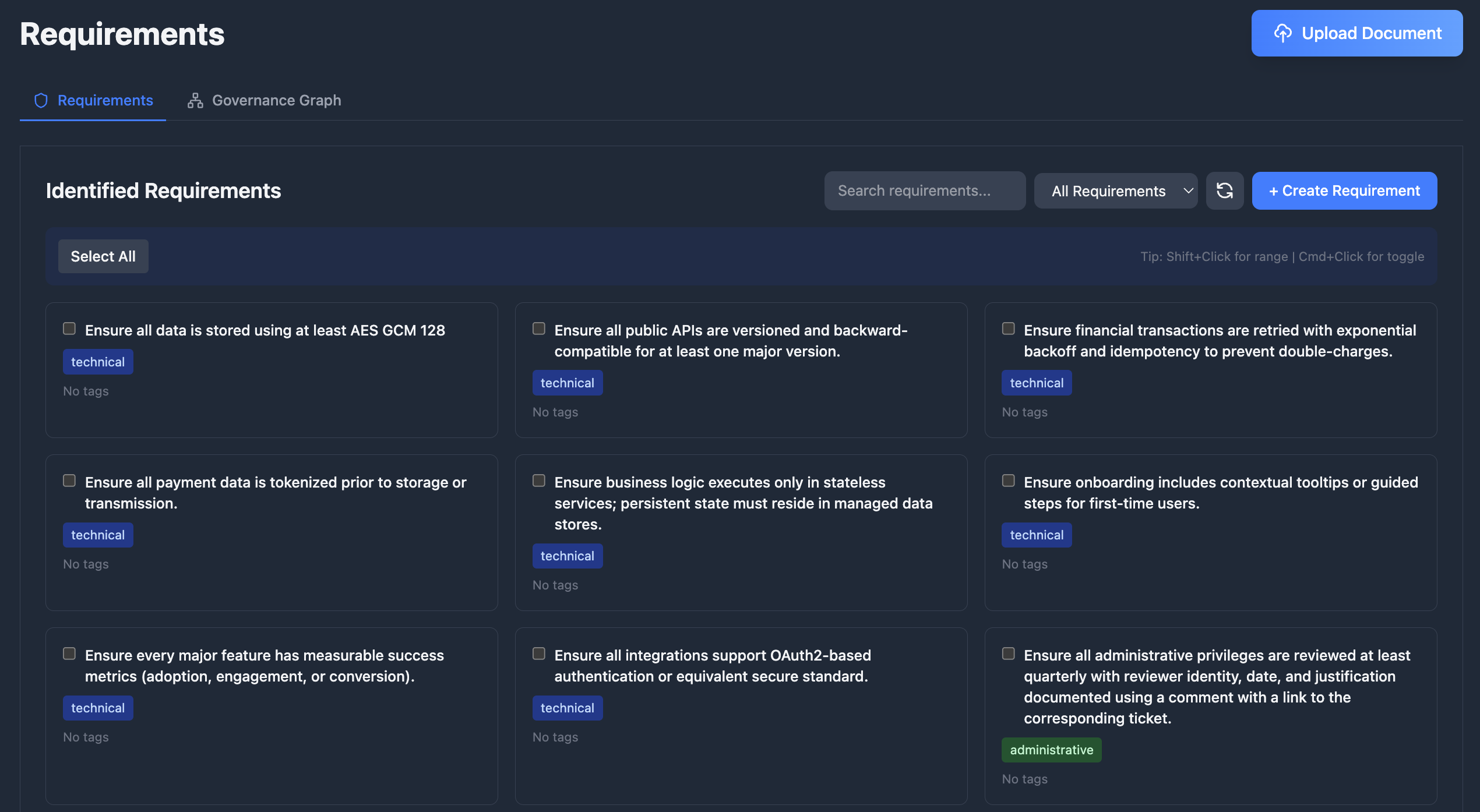
Define what needs to be enforced in your codebase at [zenable.app/requirements](https://www.zenable.app/requirements?utm_source=docs\&utm_medium=requirements-guardrails\&utm_content=requirements).
Upload documents like design documents, product requirements, or security policies and Zenable will automatically extract the requirements and
generate deterministic guardrails and specialized AI context for enforcement (patent pending).
Add, edit, enable/disable, and delete requirements, and optimize for various lifecycle stages including design, build, deploy, and runtime
enforcement.
Select one or more requirements and choose **Actions** to schedule refinement for the next nightly analysis window.
Visualize and analyze the relationships between your requirements, regulations, and technical controls with our patent pending requirements and
governance graph.
 ## Guardrails as Code
Guardrails are **deterministic code** generated to enforce each requirement. Every requirement produces one or more guardrails depending on the
requirement type and applicable enforcement engines (Semgrep, CodeQL, InSpec, AWS SCP, Azure Policy, etc.).
View and manage generated guardrails at [zenable.app/guardrails](https://www.zenable.app/guardrails?utm_source=docs\&utm_medium=requirements-guardrails\&utm_content=guardrails).
### How Guardrails Work
1. **You define a requirement** — e.g., "All S3 buckets must have encryption enabled"
2. **Zenable generates guardrails** — deterministic rules for each applicable engine and lifecycle stage
3. **Guardrails enforce automatically** — via IDE suggestions, PR reviews, pre-commit hooks, or cloud policy enforcement
### Supported Engines
| Engine | Format | Use Case |
| ------------------------------------------------------------- | ---------------- | ------------------------------------------------------------------ |
| **[Semgrep](/integrations/guardrails/semgrep)** | YAML rules | Static analysis patterns across many languages |
| **[CodeQL](/integrations/guardrails/codeql)** | QL queries | Deep semantic code analysis |
| **[InSpec](/integrations/guardrails/inspec)** | Ruby profiles | Infrastructure compliance testing |
| **[Kyverno](/integrations/guardrails/kyverno)** | YAML policies | Kubernetes admission control |
| **[OPA / Gatekeeper](/integrations/guardrails/gatekeeper)** | Rego policies | General policy-as-code, K8s admission |
| **[Conftest](/integrations/guardrails/conftest)** | Rego policies | Configuration file testing (Terraform, K8s manifests, Dockerfiles) |
| **[Checkov](/integrations/guardrails/checkov)** | Python checks | Infrastructure-as-code static analysis |
| **[ESLint](/integrations/guardrails/eslint)** | JSON config | JavaScript/TypeScript linting |
| **[AWS SCP](/integrations/guardrails/aws-scp)** | JSON policies | AWS Organization-wide service control |
| **[Azure Policy](/integrations/guardrails/azure-policy)** | JSON definitions | Azure resource governance |
| **[Kubernetes VAP](/integrations/guardrails/kubernetes-vap)** | CEL expressions | Native K8s ValidatingAdmissionPolicies |
| **[Goss](/integrations/guardrails/goss)** | YAML tests | Server and container state validation |
### Example: Requirement to Guardrail
Given the requirement **"All S3 buckets must have server-side encryption enabled"**, Zenable generates engine-specific guardrails:
```yaml Semgrep theme={null}
rules:
- id: s3-encryption-required
patterns:
- pattern: |
resource "aws_s3_bucket" $BUCKET {
...
}
- pattern-not-inside: |
resource "aws_s3_bucket_server_side_encryption_configuration" $_ {
...
rule {
...
}
}
message: S3 bucket $BUCKET is missing server-side encryption configuration
severity: ERROR
languages: [hcl]
```
```json AWS SCP theme={null}
{
"Version": "2012-10-17",
"Statement": [
{
"Sid": "DenyUnencryptedS3PutObject",
"Effect": "Deny",
"Action": "s3:PutObject",
"Resource": "*",
"Condition": {
"StringNotEquals": {
"s3:x-amz-server-side-encryption": "aws:kms"
}
}
}
]
}
```
```ruby InSpec theme={null}
control 's3-encryption' do
impact 1.0
title 'Ensure all S3 buckets have encryption enabled'
aws_s3_buckets.bucket_names.each do |bucket|
describe aws_s3_bucket(bucket) do
it { should have_default_encryption_enabled }
end
end
end
```
### Guardrail Lifecycle
* **Versioning** — each guardrail tracks the requirement version it was generated from and its build iteration
* **Regeneration** — provide feedback and regenerate; Zenable improves the next iteration while preserving any historical context
* **Runtime validation** — guardrails are automatically validated against their target engine (valid, invalid, or untested)
* **Auto-healing** — a guardrail that fails runtime validation is regenerated automatically by default, but can be disabled; each attempt learns from every prior failed attempt in the episode (the rule and the exact error it produced)
* **Regenerate now** — request an immediate regeneration on the guardrail page, alongside up to 2,000 characters of context in your request
### Hybrid Approach: Deterministic + AI
Zenable uses **both** deterministic static analysis rules and AI-powered guardrails to achieve hallucination-resistant, highly accurate enforcement
(patent pending). This combination provides:
* **Deterministic rules** for well-defined patterns (AST analysis, policy-as-code, highly refined regular expressions)
* **AI guardrails** for complex semantic analysis and context-aware validation
* **Hallucination-resistant findings** by leveraging strengths of each approach
* **High accuracy** with reduced false positives and negatives
### Performance and Customization
Zenable's Guardrails are optimized for speed and customization, leveraging highly fine-tuned models with context-specific training for different
environments and stages of the SDLC.
## Guardrails as Code
Guardrails are **deterministic code** generated to enforce each requirement. Every requirement produces one or more guardrails depending on the
requirement type and applicable enforcement engines (Semgrep, CodeQL, InSpec, AWS SCP, Azure Policy, etc.).
View and manage generated guardrails at [zenable.app/guardrails](https://www.zenable.app/guardrails?utm_source=docs\&utm_medium=requirements-guardrails\&utm_content=guardrails).
### How Guardrails Work
1. **You define a requirement** — e.g., "All S3 buckets must have encryption enabled"
2. **Zenable generates guardrails** — deterministic rules for each applicable engine and lifecycle stage
3. **Guardrails enforce automatically** — via IDE suggestions, PR reviews, pre-commit hooks, or cloud policy enforcement
### Supported Engines
| Engine | Format | Use Case |
| ------------------------------------------------------------- | ---------------- | ------------------------------------------------------------------ |
| **[Semgrep](/integrations/guardrails/semgrep)** | YAML rules | Static analysis patterns across many languages |
| **[CodeQL](/integrations/guardrails/codeql)** | QL queries | Deep semantic code analysis |
| **[InSpec](/integrations/guardrails/inspec)** | Ruby profiles | Infrastructure compliance testing |
| **[Kyverno](/integrations/guardrails/kyverno)** | YAML policies | Kubernetes admission control |
| **[OPA / Gatekeeper](/integrations/guardrails/gatekeeper)** | Rego policies | General policy-as-code, K8s admission |
| **[Conftest](/integrations/guardrails/conftest)** | Rego policies | Configuration file testing (Terraform, K8s manifests, Dockerfiles) |
| **[Checkov](/integrations/guardrails/checkov)** | Python checks | Infrastructure-as-code static analysis |
| **[ESLint](/integrations/guardrails/eslint)** | JSON config | JavaScript/TypeScript linting |
| **[AWS SCP](/integrations/guardrails/aws-scp)** | JSON policies | AWS Organization-wide service control |
| **[Azure Policy](/integrations/guardrails/azure-policy)** | JSON definitions | Azure resource governance |
| **[Kubernetes VAP](/integrations/guardrails/kubernetes-vap)** | CEL expressions | Native K8s ValidatingAdmissionPolicies |
| **[Goss](/integrations/guardrails/goss)** | YAML tests | Server and container state validation |
### Example: Requirement to Guardrail
Given the requirement **"All S3 buckets must have server-side encryption enabled"**, Zenable generates engine-specific guardrails:
```yaml Semgrep theme={null}
rules:
- id: s3-encryption-required
patterns:
- pattern: |
resource "aws_s3_bucket" $BUCKET {
...
}
- pattern-not-inside: |
resource "aws_s3_bucket_server_side_encryption_configuration" $_ {
...
rule {
...
}
}
message: S3 bucket $BUCKET is missing server-side encryption configuration
severity: ERROR
languages: [hcl]
```
```json AWS SCP theme={null}
{
"Version": "2012-10-17",
"Statement": [
{
"Sid": "DenyUnencryptedS3PutObject",
"Effect": "Deny",
"Action": "s3:PutObject",
"Resource": "*",
"Condition": {
"StringNotEquals": {
"s3:x-amz-server-side-encryption": "aws:kms"
}
}
}
]
}
```
```ruby InSpec theme={null}
control 's3-encryption' do
impact 1.0
title 'Ensure all S3 buckets have encryption enabled'
aws_s3_buckets.bucket_names.each do |bucket|
describe aws_s3_bucket(bucket) do
it { should have_default_encryption_enabled }
end
end
end
```
### Guardrail Lifecycle
* **Versioning** — each guardrail tracks the requirement version it was generated from and its build iteration
* **Regeneration** — provide feedback and regenerate; Zenable improves the next iteration while preserving any historical context
* **Runtime validation** — guardrails are automatically validated against their target engine (valid, invalid, or untested)
* **Auto-healing** — a guardrail that fails runtime validation is regenerated automatically by default, but can be disabled; each attempt learns from every prior failed attempt in the episode (the rule and the exact error it produced)
* **Regenerate now** — request an immediate regeneration on the guardrail page, alongside up to 2,000 characters of context in your request
### Hybrid Approach: Deterministic + AI
Zenable uses **both** deterministic static analysis rules and AI-powered guardrails to achieve hallucination-resistant, highly accurate enforcement
(patent pending). This combination provides:
* **Deterministic rules** for well-defined patterns (AST analysis, policy-as-code, highly refined regular expressions)
* **AI guardrails** for complex semantic analysis and context-aware validation
* **Hallucination-resistant findings** by leveraging strengths of each approach
* **High accuracy** with reduced false positives and negatives
### Performance and Customization
Zenable's Guardrails are optimized for speed and customization, leveraging highly fine-tuned models with context-specific training for different
environments and stages of the SDLC.
 ## Scoping Requirements
Scopes decide **where** a requirement applies; a requirement attached to
multiple scopes applies when **any** of them matches. Path patterns are
glob expressions (`packages/api/**`, `**/*.py`) relative to the git repo
root — outside a git repo they are compared to the absolute file path —
and user conditions take an email or a GitHub/GitLab username, matching
the person across every login method and linked account.
### Repository Metadata Conditions
Scopes can also match repositories by their **metadata** — the
[custom properties](https://docs.github.com/en/organizations/managing-organization-settings/managing-custom-properties-for-repositories-in-your-organization)
your GitHub organization defines centrally (for example `team`,
`tier`, or `compliance`). Zenable keeps each repository's properties in
sync automatically: on installation, when repository access or property
values change, and from repository metadata included in pull request events.
A metadata condition has three parts — a property **key**, an
**operator**, and (for most operators) a **value**:
| Condition | Matches repos where… |
| ------------------------------- | --------------------------------------------------------- |
| `team` **is** `payments` | the `team` property equals `payments` |
| `tier` **is not** `sandbox` | the `tier` property is set, and no value equals `sandbox` |
| `compliance` **contains** `pci` | any `compliance` value contains `pci` |
| `team` **exists** | a `team` property has a value |
| `team` **does not exist** | no `team` property is set |
Keys and values support basic `*` and `?` wildcards (`t?er` **is**
`prod*`), matching is case-insensitive, and multi-select properties
match when **any** selected value satisfies the condition. Combine
metadata conditions with repository, organization, and other rules
using the standard AND/OR/NOT rule builder.
Absence is not a value. Negative operators (**is not**, **does not
contain**) require the property to be set, so a repository with no `tier`
property does **not** match `tier` **is not** `sandbox`. To include
untagged repositories, OR in a **does not exist** condition. Repositories
with no metadata at all — including every GitLab project, since GitLab
custom properties aren't ingested yet — match only **does not exist**.
## Requirement Usage & Findings
Track how requirements impact your codebase through the [Findings Analysis](https://www.zenable.app/analysis/findings?utm_source=docs\&utm_medium=web\&utm_content=requirements-guardrails) page:
* **Requirement filtering** — filter findings by the requirement that influenced them to understand each requirement's impact; filtering is performed at the database level for fast results even with large datasets
* **Findings count** — each requirement displays how many findings it has influenced, helping you gauge adoption and effectiveness
* **Cross-navigation** — jump from a requirement directly to its related findings, or from a finding to the requirements that influenced it
* **Report widgets** — add "findings by requirement" widgets to your dashboard to visualize requirement coverage across repositories
## Integrations with CLI and IDE Tools
* **Zenable CLI**: Install and manage the MCP server, configure IDE hooks, run one-off checks, and access other helper utilities
* **MCP Integration**: IDE suggestions updated in real-time via WebSocket
* **GitHub**: PR reviews enforce latest requirements ([GitHub integration](/integrations/vcs-reviewers/github))
* **GitLab**: MR reviews enforce latest requirements ([GitLab integration](/integrations/vcs-reviewers/gitlab))
* **Pre-commit Hooks**: Local validation uses synced requirements
## Next Steps
* [Install MCP](/integrations/mcp/getting-started) for IDE integration
* [Set up GitHub reviewer](/integrations/vcs-reviewers/github) or [GitLab reviewer](/integrations/vcs-reviewers/gitlab) for automated PR/MR reviews
* [Configure pre-commit hooks](/integrations/pre-commit/getting-started) for local enforcement
* [Review CLI documentation](/integrations/zenable/commands) for programmatic access
## Scoping Requirements
Scopes decide **where** a requirement applies; a requirement attached to
multiple scopes applies when **any** of them matches. Path patterns are
glob expressions (`packages/api/**`, `**/*.py`) relative to the git repo
root — outside a git repo they are compared to the absolute file path —
and user conditions take an email or a GitHub/GitLab username, matching
the person across every login method and linked account.
### Repository Metadata Conditions
Scopes can also match repositories by their **metadata** — the
[custom properties](https://docs.github.com/en/organizations/managing-organization-settings/managing-custom-properties-for-repositories-in-your-organization)
your GitHub organization defines centrally (for example `team`,
`tier`, or `compliance`). Zenable keeps each repository's properties in
sync automatically: on installation, when repository access or property
values change, and from repository metadata included in pull request events.
A metadata condition has three parts — a property **key**, an
**operator**, and (for most operators) a **value**:
| Condition | Matches repos where… |
| ------------------------------- | --------------------------------------------------------- |
| `team` **is** `payments` | the `team` property equals `payments` |
| `tier` **is not** `sandbox` | the `tier` property is set, and no value equals `sandbox` |
| `compliance` **contains** `pci` | any `compliance` value contains `pci` |
| `team` **exists** | a `team` property has a value |
| `team` **does not exist** | no `team` property is set |
Keys and values support basic `*` and `?` wildcards (`t?er` **is**
`prod*`), matching is case-insensitive, and multi-select properties
match when **any** selected value satisfies the condition. Combine
metadata conditions with repository, organization, and other rules
using the standard AND/OR/NOT rule builder.
Absence is not a value. Negative operators (**is not**, **does not
contain**) require the property to be set, so a repository with no `tier`
property does **not** match `tier` **is not** `sandbox`. To include
untagged repositories, OR in a **does not exist** condition. Repositories
with no metadata at all — including every GitLab project, since GitLab
custom properties aren't ingested yet — match only **does not exist**.
## Requirement Usage & Findings
Track how requirements impact your codebase through the [Findings Analysis](https://www.zenable.app/analysis/findings?utm_source=docs\&utm_medium=web\&utm_content=requirements-guardrails) page:
* **Requirement filtering** — filter findings by the requirement that influenced them to understand each requirement's impact; filtering is performed at the database level for fast results even with large datasets
* **Findings count** — each requirement displays how many findings it has influenced, helping you gauge adoption and effectiveness
* **Cross-navigation** — jump from a requirement directly to its related findings, or from a finding to the requirements that influenced it
* **Report widgets** — add "findings by requirement" widgets to your dashboard to visualize requirement coverage across repositories
## Integrations with CLI and IDE Tools
* **Zenable CLI**: Install and manage the MCP server, configure IDE hooks, run one-off checks, and access other helper utilities
* **MCP Integration**: IDE suggestions updated in real-time via WebSocket
* **GitHub**: PR reviews enforce latest requirements ([GitHub integration](/integrations/vcs-reviewers/github))
* **GitLab**: MR reviews enforce latest requirements ([GitLab integration](/integrations/vcs-reviewers/gitlab))
* **Pre-commit Hooks**: Local validation uses synced requirements
## Next Steps
* [Install MCP](/integrations/mcp/getting-started) for IDE integration
* [Set up GitHub reviewer](/integrations/vcs-reviewers/github) or [GitLab reviewer](/integrations/vcs-reviewers/gitlab) for automated PR/MR reviews
* [Configure pre-commit hooks](/integrations/pre-commit/getting-started) for local enforcement
* [Review CLI documentation](/integrations/zenable/commands) for programmatic access