

Overview
The Zenable management interface defines quality, functional, and security requirements, allows you to review and refine generated guardrail code, and analyze relationships between requirements and enforcement points. Get started at zenable.app. What you can do:- Upload policy documents or define requirements directly
- Review auto-generated guardrail code (Terraform, K8s, Semgrep, etc.)
- Visualize governance graph to understand requirement dependencies
- Enable/disable specific guardrails for your environment
Requirements
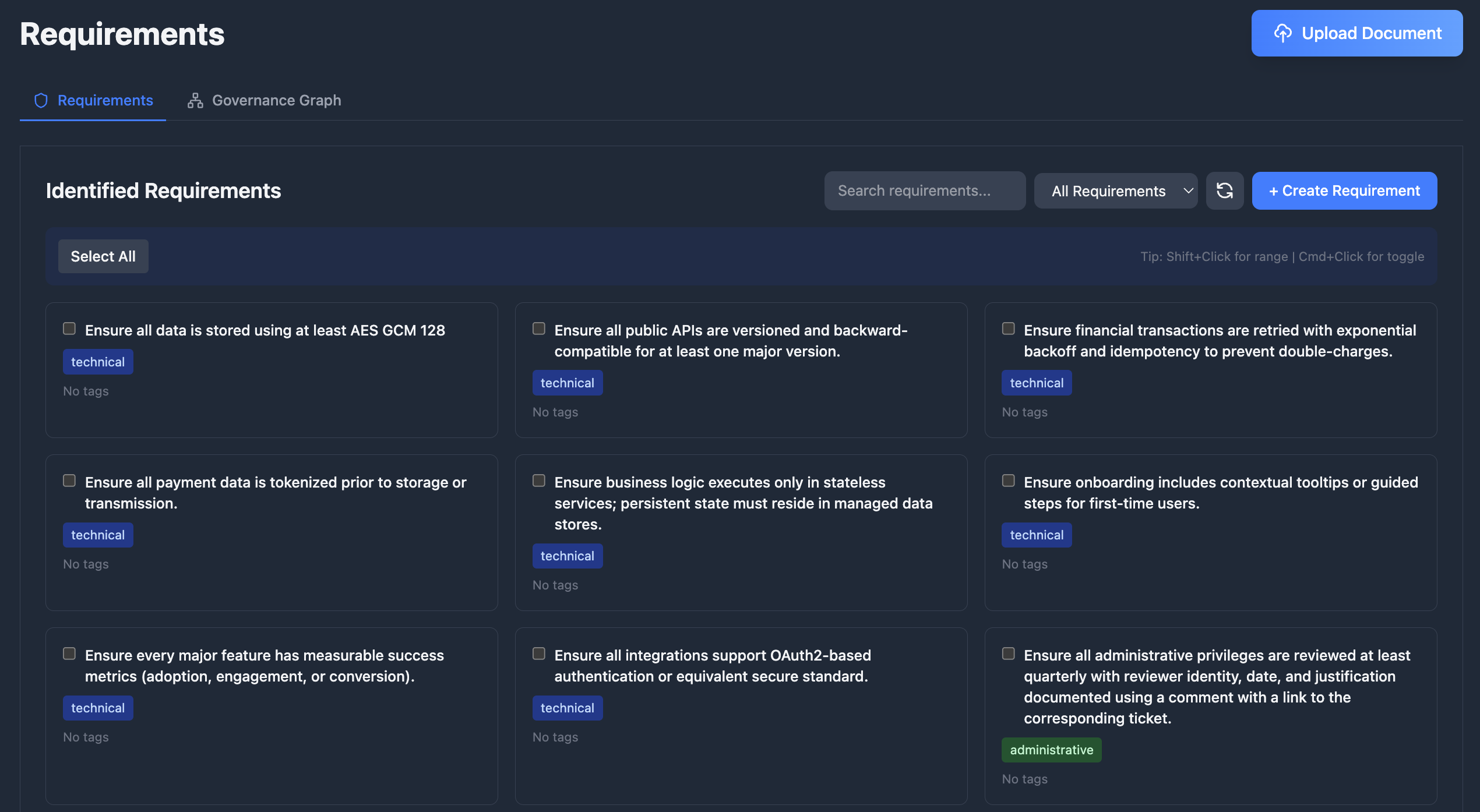
Define what needs to be enforced in your codebase at zenable.app/requirements.Upload Documents
Upload documents like design documents, product requirements, or security policies and Zenable will automatically extract the requirements and
generate deterministic guardrails and specialized AI context for enforcement (patent pending).
Create and Manage Requirements
Add, edit, enable/disable, and delete requirements, and optimize for various lifecycle stages including design, build, deploy, and runtime
enforcement.
Requirements Graph
Visualize and analyze the relationships between your requirements, regulations, and technical controls with our patent pending requirements and
governance graph.
Guardrails as Code
Guardrails are deterministic code generated to enforce each requirement. Every requirement produces one or more guardrails depending on the requirement type and applicable enforcement engines (Semgrep, CodeQL, InSpec, AWS SCP, Azure Policy, etc.). View and manage generated guardrails at zenable.app/guardrails.How Guardrails Work
- You define a requirement — e.g., “All S3 buckets must have encryption enabled”
- Zenable generates guardrails — deterministic rules for each applicable engine and lifecycle stage
- Guardrails enforce automatically — via IDE suggestions, PR reviews, pre-commit hooks, or cloud policy enforcement
Supported Engines
| Engine | Format | Use Case |
|---|---|---|
| Semgrep | YAML rules | Static analysis patterns across many languages |
| CodeQL | QL queries | Deep semantic code analysis |
| InSpec | Ruby profiles | Infrastructure compliance testing |
| Kyverno | YAML policies | Kubernetes admission control |
| OPA / Gatekeeper | Rego policies | General policy-as-code, K8s admission |
| Conftest | Rego policies | Configuration file testing (Terraform, K8s manifests, Dockerfiles) |
| Checkov | Python checks | Infrastructure-as-code static analysis |
| AWS SCP | JSON policies | AWS Organization-wide service control |
| Azure Policy | JSON definitions | Azure resource governance |
| Kubernetes VAP | CEL expressions | Native K8s ValidatingAdmissionPolicies |
| Goss | YAML tests | Server and container state validation |
Example: Requirement to Guardrail
Given the requirement “All S3 buckets must have server-side encryption enabled”, Zenable generates engine-specific guardrails:Guardrail Lifecycle
- Versioning — each guardrail tracks the requirement version it was generated from and its build iteration
- Regeneration — provide feedback and regenerate; Zenable improves the next iteration while preserving history
- Runtime validation — guardrails are automatically validated against their target engine (valid, invalid, or untested)
Hybrid Approach: Deterministic + AI
Zenable uses both deterministic static analysis rules and AI-powered guardrails to achieve hallucination-resistant, highly accurate enforcement (patent pending). This combination provides:- Deterministic rules for well-defined patterns (AST analysis, policy-as-code, highly refined regular expressions)
- AI guardrails for complex semantic analysis and context-aware validation
- Hallucination-resistant findings by leveraging strengths of each approach
- High accuracy with reduced false positives and negatives
Performance and Customization
Zenable’s Guardrails are optimized for speed and customization, leveraging highly fine-tuned models with context-specific training for different environments and stages of the SDLC.
Requirement Usage & Findings
Track how requirements impact your codebase through the Findings Analysis page:- Requirement filtering — filter findings by the requirement that influenced them to understand each requirement’s impact; filtering is performed at the database level for fast results even with large datasets
- Findings count — each requirement displays how many findings it has influenced, helping you gauge adoption and effectiveness
- Cross-navigation — jump from a requirement directly to its related findings, or from a finding to the requirements that influenced it
- Report widgets — add “findings by requirement” widgets to your dashboard to visualize requirement coverage across repositories
Integrations with CLI and IDE Tools
- Zenable CLI: Install and manage the MCP server, configure IDE hooks, run one-off checks, and access other helper utilities
- MCP Integration: IDE suggestions updated in real-time via WebSocket
- GitHub: PR reviews enforce latest requirements (GitHub integration)
- GitLab: MR reviews enforce latest requirements (GitLab integration)
- Pre-commit Hooks: Local validation uses synced requirements
Next Steps
- Install MCP for IDE integration
- Set up GitHub reviewer or GitLab reviewer for automated PR/MR reviews
- Configure pre-commit hooks for local enforcement
- Review CLI documentation for programmatic access