

Overview
The Zenable management interface defines quality, functional, and security requirements, allows you to review and refine generated verifier rule code, and analyze relationships between requirements and enforcement points. Get started at zenable.app. What you can do:- Upload policy documents or define requirements directly
- Review auto-generated verifier rule code (Terraform, K8s, Semgrep, etc.)
- Visualize governance graph to understand requirement dependencies
- Enable/disable specific verifier rules for your environment
Requirements
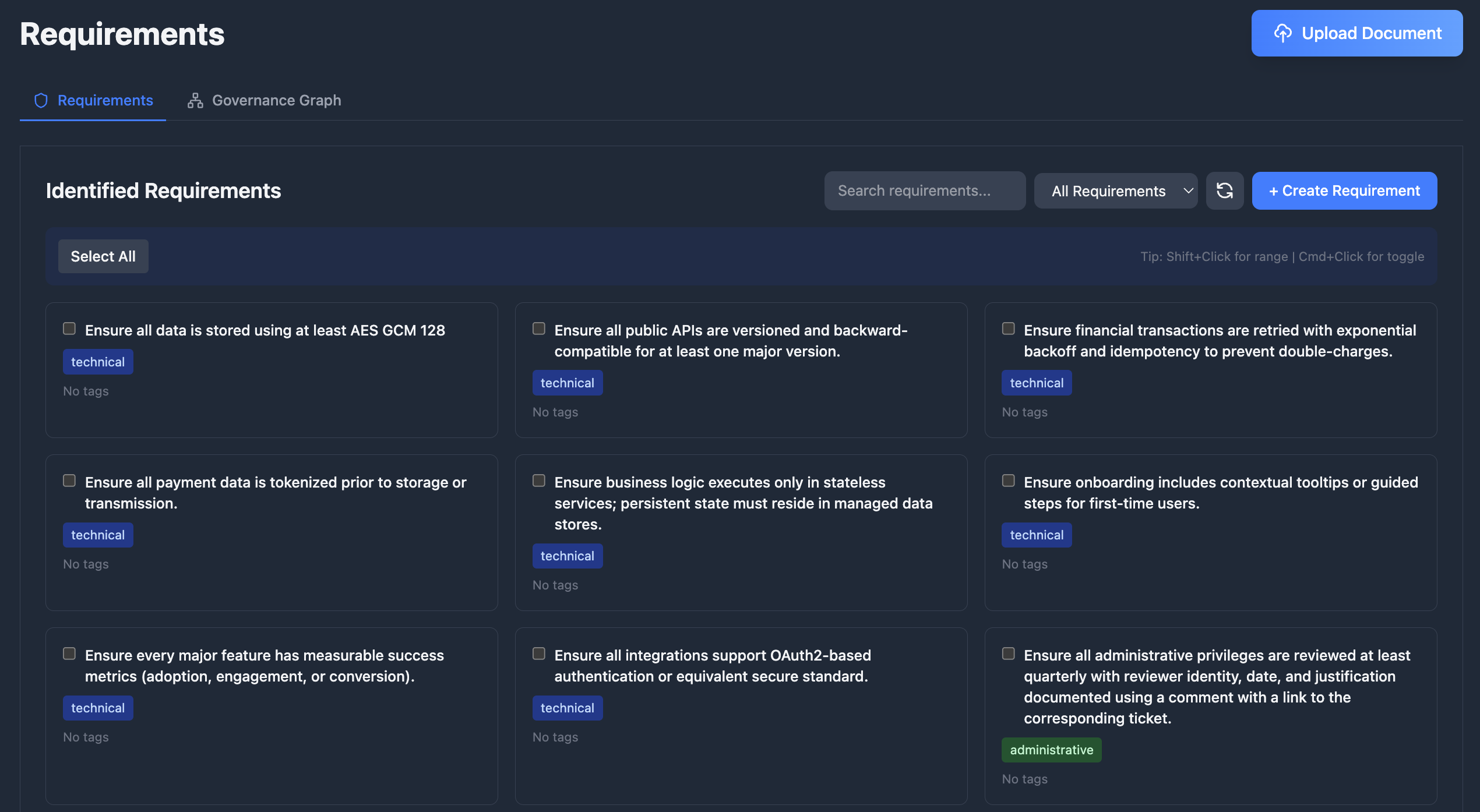
Define what needs to be enforced in your codebase at zenable.app/requirements.Upload Documents
Upload documents like design documents, product requirements, or security policies and Zenable will automatically extract the requirements and
generate deterministic verifier rules and specialized AI context for enforcement (patent pending).
Create and Manage Requirements
Add, edit, enable/disable, and delete requirements, and optimize for various lifecycle stages including design, build, deploy, and runtime
enforcement.
Requirement Actions
Select one or more requirements and choose Actions to schedule refinement for the next nightly analysis window.
Requirements Graph
Visualize and analyze the relationships between your requirements, regulations, and technical controls with our patent pending requirements and
governance graph.
Requirement Lineage
Open the version history modal on any requirement and switch to the Lineage view to see the full split and merge ancestry as a scrollable DAG. Each node represents a requirement family with its version history; hover for details, click to open that requirement.
Verifier Rules as Code
Verifier rules are deterministic code generated to enforce each requirement. Every requirement produces one or more verifier rules depending on the requirement type and applicable enforcement engines (Semgrep, CodeQL, Checkov, AWS SCP, Azure Policy, etc.). View and manage generated verifier rules at zenable.app/verifier-rules.How Verifier Rules Work
- You define a requirement — e.g., “All S3 buckets must have encryption enabled”
- Zenable generates verifier rules — deterministic rules for each applicable engine and lifecycle stage
- Verifier rules enforce automatically — via IDE suggestions, PR reviews, pre-commit hooks, or cloud policy enforcement
Supported Engines
Example: Requirement to Verifier Rule
Given the requirement “All S3 buckets must have server-side encryption enabled”, Zenable generates engine-specific verifier rules:Verifier Rule Lifecycle
- Versioning — each verifier rule tracks the requirement version it was generated from and its build iteration
- Regeneration — provide feedback and regenerate; Zenable improves the next iteration while preserving any historical context
- Runtime status — each verifier rule carries a runtime status (valid, invalid, or untested) reported by whatever runs it against its target engine: the CLI, or Zenable’s own checks. An invalid report is always recorded and shown on the verifier rule page, whatever the settings below
- When this verifier rule is reported invalid — a per-verifier-rule setting that decides whether the CLI stops running it (the default) or keeps running it. It changes only whether the rule runs; the verifier rule still shows as reported invalid either way
- Auto-healing — a verifier rule reported invalid is regenerated automatically by default, but can be disabled. This setting is independent of whether the verifier rule stops or keeps running. Each attempt learns from every prior failed attempt in the episode (the rule and the exact error it produced)
- Regenerate now — request an immediate regeneration on the verifier rule page, alongside up to 2,000 characters of context in your request
Enforcing verifier rules is free and unlimited on every plan, including Free.
Generating a new version — by feedback, Regenerate now, or auto-healing —
costs 550 credits per regeneration from the requesting user’s weekly pool.
See Plans and Usage.
Hybrid Approach: Deterministic + AI
Zenable uses both deterministic static analysis rules and AI-powered guardrails to achieve hallucination-resistant, highly accurate enforcement (patent pending). This combination provides:- Deterministic rules for well-defined patterns (AST analysis, policy-as-code, highly refined regular expressions)
- AI guardrails for complex semantic analysis and context-aware validation
- Hallucination-resistant findings by leveraging strengths of each approach
- High accuracy with reduced false positives and negatives
Performance and Customization
Zenable’s verifier rules are optimized for speed and customization, leveraging highly fine-tuned models with context-specific training for different environments and stages of the SDLC.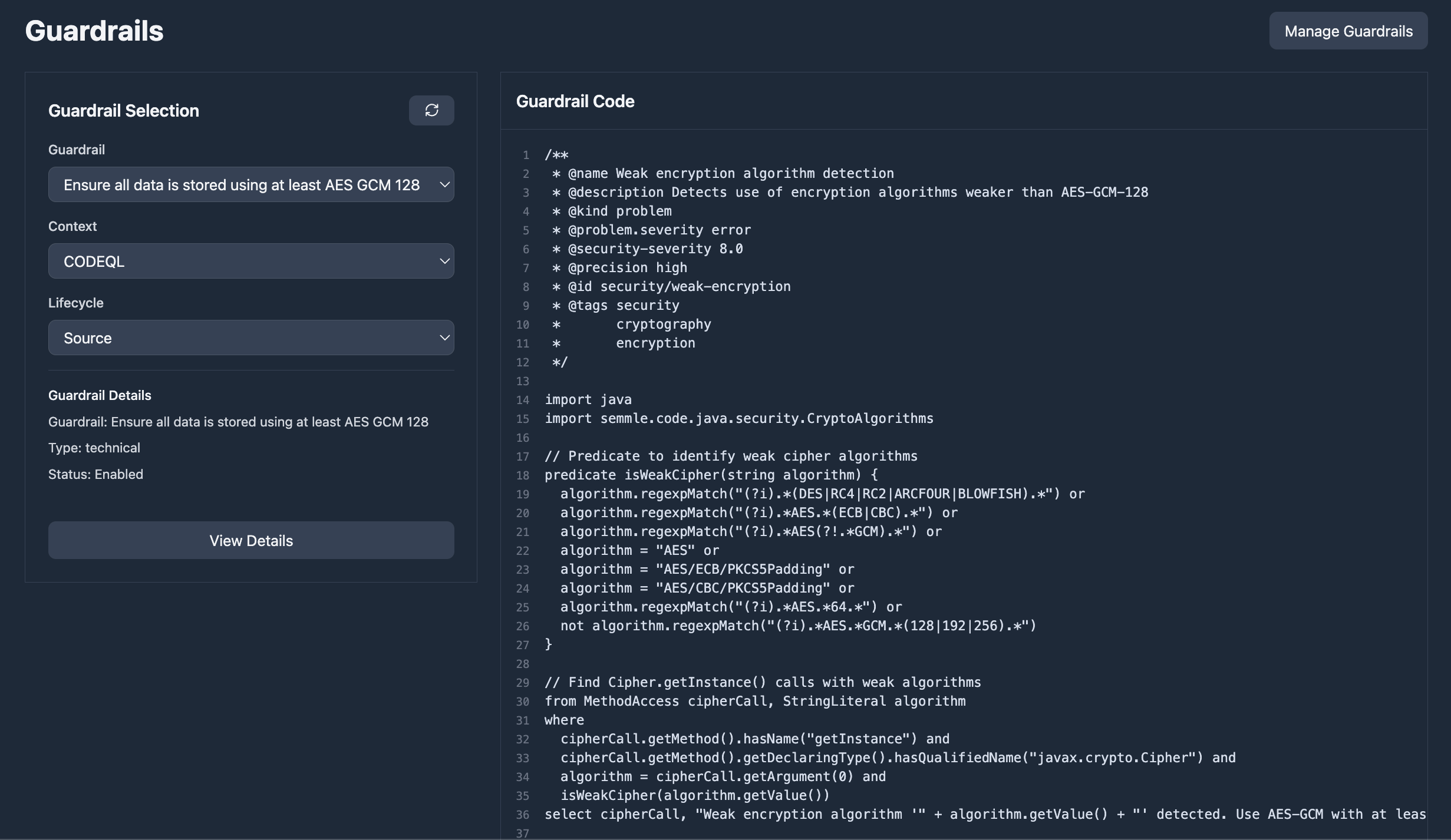
Eval Suites
Every requirement has an eval suite: code examples that meet the requirement and code examples that fail to meet it. The suite starts from the requirement’s own examples, and Zenable grows it to a balanced set. Each night Zenable runs the requirement and its verifier rules against the suite to check that the requirement is written effectively: how often it catches what it should (recall), how often its findings are right (precision), and the balance of the two (F1). Each score names the AI model it was measured on, and the model used automatically aligns with the ones your coding agents use on the code base via the Zenable IDE integration. When the evals show room to improve, Zenable automatically tests alternative wordings and proposes an update when one scores higher. Your approval policy decides whether to accept it, and a person can always accept or decline it. Add your own examples from the requirement page, the MCP tools, the CLI, or the API; anyone who can edit requirements can add them.Scoping Requirements
Scopes decide where a requirement applies; a requirement attached to multiple scopes applies when any of them matches. Path patterns are glob expressions (packages/api/**, **/*.py) relative to the git repo
root — outside a git repo they are compared to the absolute file path —
and user conditions take an email or a GitHub/GitLab username, matching
the person across every login method and linked account.
Repository Metadata Conditions
Scopes can also match repositories by their metadata — the custom properties your GitHub organization defines centrally (for exampleteam,
tier, or compliance). Zenable keeps each repository’s properties in
sync automatically: on installation, when repository access or property
values change, and from repository metadata included in pull request events.
A metadata condition has three parts — a property key, an
operator, and (for most operators) a value:
Keys and values support basic
* and ? wildcards (t?er is
prod*), matching is case-insensitive, and multi-select properties
match when any selected value satisfies the condition. Combine
metadata conditions with repository, organization, and other rules
using the standard AND/OR/NOT rule builder.
Absence is not a value. Negative operators (is not, does not
contain) require the property to be set, so a repository with no
tier
property does not match tier is not sandbox. To include
untagged repositories, OR in a does not exist condition. Repositories
with no metadata at all — including every GitLab project, since GitLab
custom properties aren’t ingested yet — match only does not exist.Integration Conditions
Scopes can target a specific integration, turning a requirement on or off for one part of your toolchain:- All GitHub installations or All GitLab installations — applies to that provider’s PR/MR reviews.
- A single installation — applies only to reviews from that one GitHub App or GitLab installation.
- Zenable CLI/IDE — applies to
zenable check, pre-commit, and IDE hook runs.
Testing a Scope
Before a scope goes live, you can verify it matches exactly what you intend. Open the test panel from the grey test icon in the scope editor header (for an unsaved draft) or in Scope Details (for a saved scope). Pick a repository, an optional author, and an optional integration, then paste file paths one per line. Zenable evaluates the scope server-side — the same way a PR review does — and shows ✓ or ✗ for each path with an N of M match count. Hovering over a result reveals a per-node trace of the full rule tree and the evaluation context (organization, the author’s link status and groups, the repository’s metadata).The test icon is visible only to users with
scopes:write. Draft scopes send their unsaved expression to the server, so what you test is always the current editor state, not the last saved version.Requirement Usage & Findings
Track how requirements impact your codebase through the Findings Analysis page:- Requirement filtering — filter findings by the requirement that influenced them to understand each requirement’s impact; filtering is performed at the database level for fast results even with large datasets
- Findings count — each requirement displays how many findings it has influenced, helping you gauge adoption and effectiveness
- Cross-navigation — jump from a requirement directly to its related findings, or from a finding to the requirements that influenced it
- Report widgets — add “findings by requirement” widgets to your dashboard to visualize requirement coverage across repositories
Integrations with CLI and IDE Tools
- Zenable CLI: Install and manage the MCP server, configure IDE hooks, run one-off checks, and access other helper utilities
- MCP Integration: IDE suggestions updated in real-time via WebSocket
- GitHub: PR reviews enforce latest requirements (GitHub integration)
- GitLab: MR reviews enforce latest requirements (GitLab integration)
- Pre-commit Hooks: Local validation uses synced requirements
Next Steps
- Install MCP for IDE integration
- Set up GitHub reviewer or GitLab reviewer for automated PR/MR reviews
- Configure pre-commit hooks for local enforcement
- Review CLI documentation for programmatic access